Posts

Camera/Object Fade

Image
Object fades based on camera position This is a bit of a side-experiment i wanted to do. I found a Twitter post by Tom Looman where he made a character fade: Quick character fade test using Dithered Opacity Mask in @UnrealEngine 4.11 (with TemporalAA enabled) pic.twitter.com/XJ73XfPGiq — Tom Looman (@t_looman) April 17, 2016 I wanted to try figuring how to fade object while ensuring it keeps its lighting properties, like the way he made. From what I can gather from his tweet the material he used was masked which makes sense as it keeps all the lighting information. Also translucent would just look weird. He enabled Dithered Opacity Mask and Temporal AA along with some material Maths: @Scourged_Wolf @UnrealEngine Dither effect is just a checkbox (in 4.11) and material FX blends alpha, cam pos vs obj pos distance — Tom Looman (@t_looman) April 20, 2016 Here is the material setup: Material Setup using Tom Looman's approach. I divided it by the object ra...
Distance Field water foam

Image
Distance Field Foam Vectortoradialvalue, DistanceFieldGradient used for U channel and DistanceToNearestSurface used for V. I thought about how texture coordinates worked and how VectorToRadialValue worked. Both being gradients in R(U) and G(V), I had a theory about creating coordinates based on using Distancetonearestsurface node as G(V) channel and have VectorToRadialValue or Distancefieldgradient node as the R(U) channel. I was initially going to use the DistanceFieldGradient node that I learned about when making the distance field flow map. This is because the node had that Texture coordinate look to it but it adds a lot to the shader instructions so I went with VectorToRadialValue node. I extracted and used maths for the R channel from VectorToRadialValue and it produced the coordinates I wanted. I then added this coordinate to the noise based foam I made earlier using Alex Vinogradov's approach. I later decided to add Distancefieldgradient node just to see if it pro...

Distance field Flow Maps

I was doing further research on distance fields and stumbled across distance field flow maps in the UE4 forums. I'm looking into adding flow maps as the final feature of the water surface.  However, it works a lot different from what I intend to create. I was going to use flow maps for vertex painting rivers. Distance field flow maps change the direction of the flow when an object is overlapping the water surface, thus producing a more convincing result. It might be an idea to combine this technique with the flow map I intend to make. Here is the thread for the distance field flow maps:  https://forums.unrealengine.com/development-discussion/rendering/47456-distance-field-flow-map

Distance field Water Foam

Image
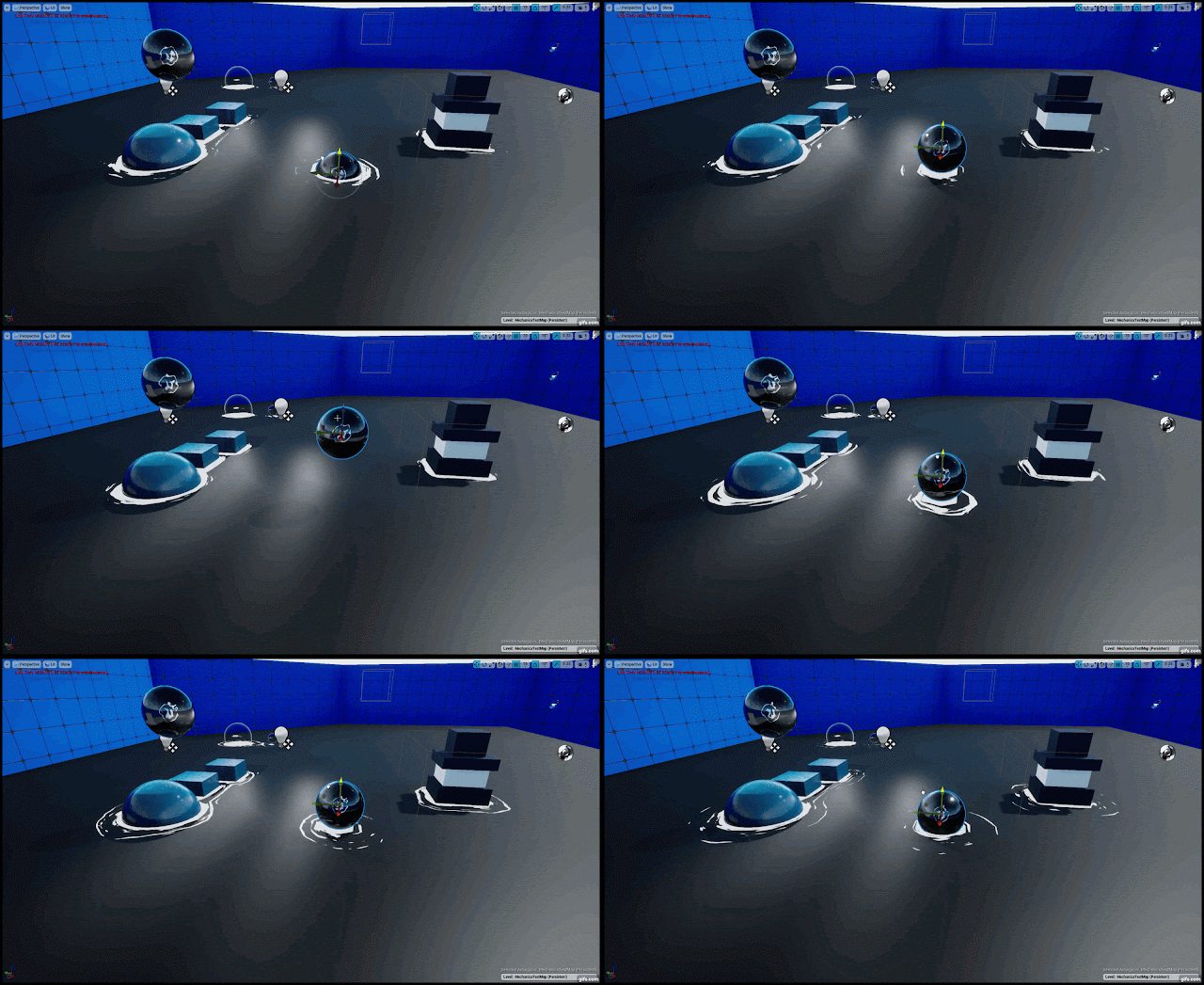
After completing work on the Gerstner wave. I remembered that there were water foams in the water system mentioned in Simon Trumpler's Blog. The foam uses 2  unique looking textures panning that uses a disk mesh however the Mesh UVs made the foam. I've also been looking at other water foams other artists have made. I noticed that Alex Vinogradov also produced the same result using a similar technique as Simon's method but with traditional noise textures. It produced a uniform result with the noise texture he used. Basically, we just spawning some meshes around object with random rotation and distortion and dissolving the texture with alpha erosion #gamedev #indiedev #UE4 #realtimevfx pic.twitter.com/UhDoS9zOz1 — Alex Vinogradov (@yarpoplar) June 28, 2018 You can see the full guide here:   https://www.artstation.com/artwork/20Kzy I recalled that Vectortoradialvalue is a node in one of my older projects that force distorts the texture Coordinat...

Gerstner Wave Normal map

Image
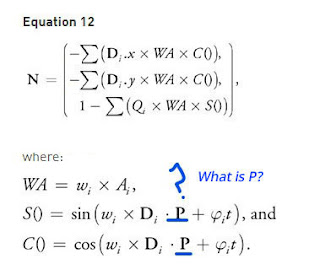
Its been a busy 3 weeks, I needed to prepare for the poster presentation and had great work experience opportunity. I was still able to squeeze in a bit of time to continue the work on the water. I've been looking into making the Tangent Space Normal Map that the Gerstner Wave tutorial didn't cover. There seems to be a Gap in this area that hasn't been fully been realised and I thought I'd try finding out. Equation 12 for Tangent space Normal map for Gerstner Wave. Nvidia GPU Gems book does not define what P is. I've been looking at the Nvidia GPU Gems book that the Gerstner Wave Video was following:  https://developer.nvidia.com/gpugems/GPUGems/gpugems_ch01.html . The video really explained what the confusing equations are doing and it made things easier for me to understand. I was able to go through equation 12 of the book without much problem. There was one issue with the equation. When making S() and C(), I don't understand what...

Its GDC!

Image
Its GDC and Ryan Brucks mentioned on Twitter he will be doing a talk on how he made his amazing water at the Tech Art Bootcamp. I just hope it becomes available on the UE4 Youtube channel and not on GDC Vault. I'd have to either pay for GDC pass or wait a year for it to become available. 😥 Here is the tweet: Hey GDC goers! I will be giving a talk at the Tech Art Bootcamp. This will go into everything about that one ocean scene everybody is always asking for a tutorial of, plus general methods for using shaders and distancefields for FX. Stop by! Mar19 10am. https://t.co/YfZKQs3LMQ — Ryan Brucks (@ShaderBits) March 4, 2019  Here is the shader I'm hoping to learn about:

Gerstner Wave Livestream

Image
I was watching the Gerstner Wave Livestream but there a few things that are worth noting down but I forgot what they were. So I went through it again and at the same time I created the material and made Notes. Here are the notes made: Mentions that Wavelength (L) and Speed (S) could be related to each other based on physics/gravity? livestream vaguely mentions this. Might be worth looking into. Time: 41:50 Some people divide the Gerstner Waves by the number of Gerstner Waves used for a nicer result. Time:51:30 Uses Screen Space Normals which is expensive. Requires turning off tangent space in details panel of the material to set it to world space. Time:52:20 Says there is a way to do Tangent Space Normal (Cheaper) but does not cover this using Cosine but he sticks to Screen Space Normal. Time:53:40 This is not related to the Gerstner Wave but mentions "Texture Bombing" to break up tiling. Might be still worth learning about for general purposes. Time1:05:1...